Paper To AI Billing
From paper invoices and calculator math to a QuickBooks connected AI MacBook billing workspace.
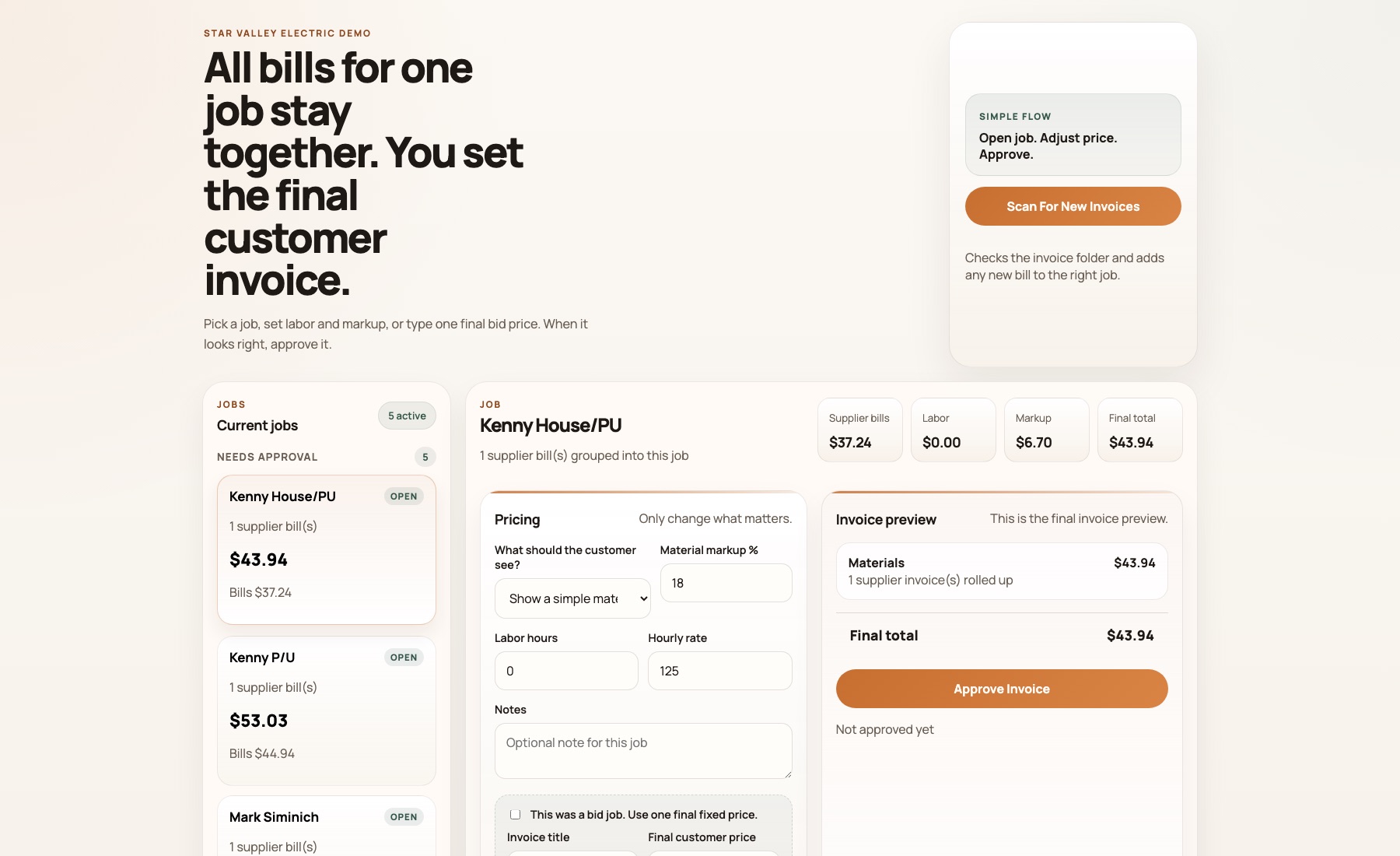
Operator-facing billing workspace for grouping supplier invoices, reviewing jobs, and preparing QuickBooks invoices.
Star Valley Electric used to print supplier invoices, sort them by job on a table, mark up materials by hand, calculate totals, and email the numbers to the QuickBooks person. DOBE moved the business onto a dedicated AI MacBook workspace connected to QuickBooks Online so invoice emails can be read, grouped by job, reviewed with the owner, and turned into approved QuickBooks invoices.
Client / Project
Star Valley Electric
Project Type
AI MacBook billing workspace
Location
Star Valley, Wyoming
Tools Used
Proof Points
The Problem
Star Valley Electric's billing process was still mostly physical. Supplier invoices were printed, spread across a table, and sorted into jobs by hand.
Materials were marked up with pen and pencil. Labor and totals were added with a calculator. Once the job looked right, the numbers were typed into an email for the QuickBooks person to recreate inside QuickBooks.
The real workflow lived across paper stacks, handwritten notes, calculator math, email threads, and a separate accounting handoff before the invoice could actually go out.
What DOBE Built
DOBE moved Star Valley Electric from the old office Mac setup onto a dedicated MacBook workspace built around the way the business actually operates.
The setup included a backup-first migration, moving the working business files and QuickBooks audit material, cleaning the new MacBook into one obvious Star Valley Electric workspace, and validating that unrelated setup clutter was removed.
The workspace was connected to Star Valley Electric's live QuickBooks Online company and seeded from real QBO data so the MacBook could become the operating hub for billing work instead of another disconnected tool.
How It Works
Invoice emails and attachments arrive in the business workflow.
The AI reads the invoice details and identifies invoice-related messages.
Supplier invoices are sorted by customer or job.
The owner tells the AI what markup, labor hours, or fixed adjustments need to be added.
The AI prepares the job for review instead of forcing the owner to rebuild the math by hand.
The owner reviews and approves the invoice.
The approved invoice is created through QuickBooks.
Why It Matters
The system keeps the owner's judgment in the process. It does not pretend every contractor invoice is clean or obvious.
The AI handles the repetitive work around reading, sorting, grouping, recalculating, and preparing the invoice draft.
That matters because the old process was not just slow. It required someone to hold the whole job context in their head while moving the same numbers from paper to email to QuickBooks.
Result
Star Valley Electric moved from an old Mac and paper-table billing process into a clean AI MacBook workspace connected to QuickBooks Online.
Billing becomes a review-and-approve workflow instead of a print, sort, calculate, email, and rebuild process.
The owner can give billing instructions conversationally while the AI prepares the QuickBooks-ready work behind the scenes.
The Problem: Billing lived on paper
The old process started with printed supplier invoices. They were sorted by job on a table, marked up by hand, added with a calculator, and then typed into an email so another person could rebuild the invoice in QuickBooks.
That meant billing depended on paper stacks, handwritten markup, manual math, and a handoff before the invoice could be sent.
The Setup: A clean AI MacBook workspace
DOBE moved the working setup onto a new MacBook, organized the Star Valley Electric workspace, connected it to QuickBooks Online, and verified that the workspace could call the live company data directly.
The point was not to add another app. The point was to make the MacBook the place where billing work could be read, organized, reviewed, and sent.
The Output: QuickBooks invoices after owner approval
Invoice emails are read and grouped by customer or job. The owner can tell the AI what markup and labor to add, review the result, and approve the invoice before it is created through QuickBooks.
The workflow keeps the owner in control while removing the repetitive sorting, math, retyping, and accounting handoff.
Operator-facing billing workspace for grouping supplier invoices, reviewing jobs, and preparing QuickBooks invoices.
What this page can show
- Old Mac to new MacBook cutover
- Dedicated Star Valley Electric workspace
- QuickBooks Online connected
- Live QBO access verified
- Invoice emails sorted by job/customer
- Markup and labor instructions handled conversationally
Still building invoices from paper, email, and calculator math?
If your billing process still depends on printed invoices, email handoffs, or someone retyping the same numbers into QuickBooks, DOBE can build the first AI MacBook workflow around how your business already works.
Find The First Job For Your AI Mac